יוצר מצגות בינה מלאכותית

מצגות טובות ומהירות יותר עם בינה מלאכותית

מצגות בולטות שמרתקות את הקהל שלך תוך דקות.
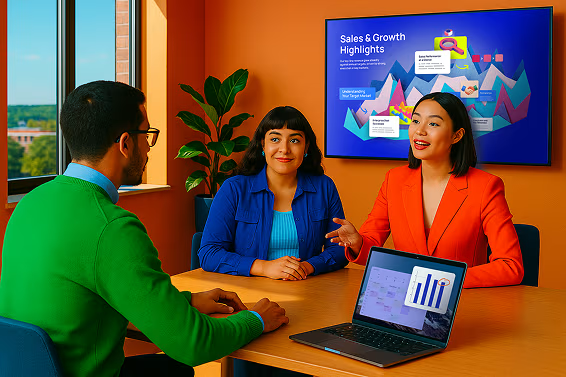
זה עוזר ל-AI להבין טוב יותר את הכוונה שלך.
  • עסקים

    מותאם לטון מקצועי ולמטרות ברורות.

  • אוניברסיטה

    מתאים לקהל אקדמי עם ניתוח מעמיק.

  • בית ספר

    מעניין וקל להבנה עבור תלמידים.

  • אחר

    ציין קהל יעד מותאם אישית בהנחיה למעלה.

נסה ליצור

צור מצגות בלתי נשכחות לצוותים ובתי ספר מודרניים עם כלי המצגות המבוסס על בינה מלאכותית של Prezi.

  • Cisco logo.
  • Autodesk logo
  • Salesforce logo
  • Airbus logo
  • Staples logo
  • Sony logo
  • BMW logo
  • Fujitsu logo
  • Discovery logo
צרו בעזרת בינה מלאכותית

במשך 15 שנה Prezi קבעה את רף המצגות המרשימות. כעת, אנחנו מגדירים מחדש את עתיד התצוגה בעזרת בינה מלאכותית.

למידע נוסף
Curved thread design with a gradient transitioning from yellow to orange to pink on a black background.
צרו בעזרת בינה מלאכותית

במשך 15 שנה Prezi קבעה את רף המצגות המרשימות. כעת, אנחנו מגדירים מחדש את עתיד התצוגה בעזרת בינה מלאכותית.

למידע נוסף

מרעיון למצגת, בקלות

הציגו רעיונות נועזים, צרו אלמנטים ויזואליים שמושכים תשומת לב, והפיחו חיים בכל רעיון בעזרת Prezi AI.
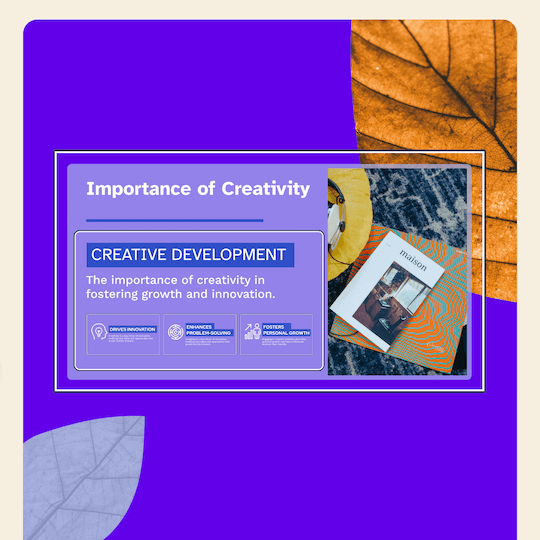
התחילו
Using AskAI features to enhance a text paragraph by selecting it and adding icons to improve the layout composition.
Icon representing a computer

עצבו בעזרת בינה מלאכותית

הזן הנחיה וקבל מצגת שלמה.

Icon representing expert advice

ייעוץ מומחים

המלצות מותאמות אישית מ-AI בכל שלב בדרך.

Icon representing visualization with an eye

המחישו כל דבר באופן ויזואלי

תבניות מותאמות של בינה מלאכותית להתחלה מושלמת.

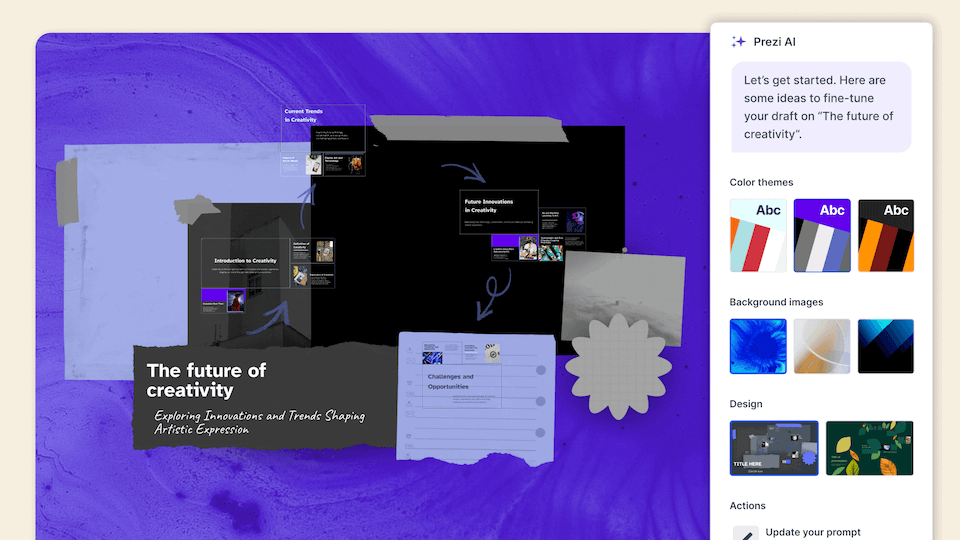
Demonstration of changing color palettes, adding a background image, and selecting a different template.

כל מה שאתה צריך כדי ליצור את מה שאתה רוצה

צרו מצגות מדהימות בעזרת תבניות, נכסים ועזרה מבוססת בינה מלאכותית שיהפכו את תהליך היצירה לקל מאי פעם.
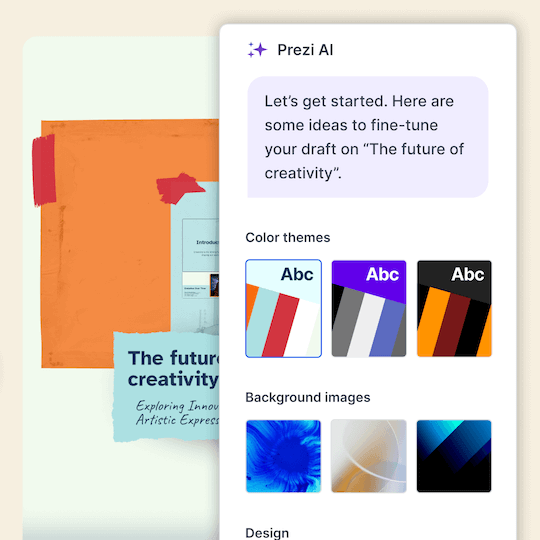
התחילו
Demonstration of changing color palettes, adding a background image, and selecting a different template.
Icon representing engagement, showing a smiling face surrounded by dynamic lines to convey excitement and interaction.

הפכו תוכן

הזינו את ההנחיות שלכם וקבלו מצגת מלאה.

Icon representing engagement, showing a smiling face surrounded by dynamic lines to convey excitement and interaction.

הציגו אותו בצורה מושלמת

למעלה ממיליון תמונות, קבצי GIF ועוד אשר ימחישו כל רעיון.

Icon representing engagement, showing a smiling face surrounded by dynamic lines to convey excitement and interaction.

צרו עיצוב מרהיב

מסגרות בעיצוב יפה ולהצגה בקלות.

Demonstration of changing color palettes, adding a background image, and selecting a different template.

התבלטו מעל כולם

השאירו מצגות משעממות מאחור והרשימו את הקהל שלכם עם מצגות שמרתקות.

התחילו
Using AskAI features to enhance a text paragraph by selecting it and adding icons to improve the layout composition.
Icon representing engagement, showing a smiling face surrounded by dynamic lines to convey excitement and interaction.

עודדו את קהל היעד לפעולה

4 מתוך 5 אומרים ש-Prezi יעיל יותר בלכידת תשומת לב.*

Icon representing engagement, showing a smiling face surrounded by dynamic lines to convey excitement and interaction.

התקדמו בכל סדר רצוי

גשו ישירות אל מה שהקהל שלכם רוצה לראות.

Icon representing engagement, showing a smiling face surrounded by dynamic lines to convey excitement and interaction.

הציגו בכל מקום

Prezi Video מציג אתכם ואת התוכן שלכם יחד על המסך.

Video of a prompt being edited, changing a template and going to present mode

מגישים אמיתיים מנצחים עם Prezi

שאלנו מקצוענים כמוך מה הם חושבים על Prezi. הנה מה שהם אמרו:*

Icon representing engagement, showing a smiling face surrounded by dynamic lines to convey excitement and interaction.

4 מתוך 5

אומרים ש-Prezi יעילה יותר בלכידת תשומת לב הקהל שלהם.

Icon symbolizing persuasion, featuring a speech bubble or dialog element with emphasis lines suggesting convincing communication.

3 מתוך 4

הייתי ממליץ על Prezi לעמית.

Time icon showing a stylized clock face, representing speed, efficiency, or time-saving.

91%

אומרים ש-Prezi שיפרה את תוצאות העבודה שלהם באופן חיובי.

*מבוסס על סקר יולי 2025 בקרב אנשי מכירות, שיווק, הדרכה וייעוץ.

מוסדות שמבינים את כוחן של מצגות מעולות סומכים עלינו

  • Cisco logo.
  • Autodesk logo
  • Salesforce logo
  • Airbus logo
  • Staples logo
  • Sony logo
  • BMW logo
  • Fujitsu logo
  • Discovery logo

ראו מדוע הלקוחות שלנו אוהבים אותנו

Prezi מדורגת כמובילה במצגות שמושכות תשומת לב בכל התעשיות, בהתבסס על מאות ביקורות לקוחות נלהבות.

start ratingstart ratingstart ratingstart ratingstart rating
4.6
2,010 חוות דעת
start ratingstart ratingstart ratingstart ratingstart rating
4.6
1,934 חוות דעת
G2 Top 50 office products awards 2023 badgeG2 leader fall 2023 badge

ראו מדוע הלקוחות שלנו אוהבים אותנו

Prezi מדורגת כמובילה במצגות שמושכות תשומת לב בכל התעשיות, בהתבסס על מאות ביקורות לקוחות נלהבות.

  • start ratingstart ratingstart ratingstart ratingstart rating
    4.6
    2,010 חוות דעת
  • start ratingstart ratingstart ratingstart ratingstart rating
    4.6
    1,934 חוות דעת

העתיד של מצגות מבוססות AI
כבר כאן.

נסו את Prezi בחינם

שאלות נפוצות

  • What is Prezi’s AI presentation maker?

    Prezi AI is an AI presentation maker that helps you create a complete, polished presentation from a prompt or uploaded file, like a PDF, PPT, or DOC. It generates a structured draft with suggested slide titles, key points, and design theme so you can move from idea to presentation faster.

  • איך עובד מעצב המצגות של Prezi המבוסס על בינה מלאכותית?

    Prezi's AI presentation designer turns your ideas into polished presentations effortlessly. After entering a prompt or uploading an existing file like a PDF or Word document, Prezi AI generates a complete presentation with customized layouts, frame designs, and visual elements. You can then make final tweaks with our AI image generator and text editor before presenting.

  • האם Prezi יכול ליצור מצגת PowerPoint (PPT) באמצעות בינה מלאכותית?

    Yes. If you want an AI PowerPoint presentation maker workflow, you can use Prezi AI to draft your presentation quickly and then export or share it in the format your team needs, like exporting to a PowerPoint.

  • האם אני יכול להפוך מסמך קיים למצגת באמצעות בינה מלאכותית?

    Yes. Prezi AI can help you create a presentation with AI from existing content. Add a prompt or upload content, and Prezi AI generates an outline and slide-by-slide draft with layouts and visuals you can refine. You stay in control and can edit text, reorder slides, and adjust design before presenting.

  •  האם Prezi הוא כלי AI חינמי ליצירת מצגות?

    Yes, Prezi is available as a free presentation software with AI-powered features included. If you want unlimited access to Prezi AI, you can try a free trial or upgrade to a paid subscription. No matter which subscription you choose, you will be able to present with Prezi's unique format that makes content more engaging and memorable.

  • במה Prezi שונה ממחוללי מצגות AI אחרים?

    While most AI presentation tools force your content into generic templates, Prezi AI takes a smarter approach. Based on your unique content, Prezi AI generates a presentation with custom design, colors, and images specifically tailored to your message, no templates required. Your content provides all the direction needed to create a truly personalized presentation.

  • אילו סוגי מצגות אני יכול ליצור עם Prezi AI?

    With Prezi AI, you can create presentations for work, school, and personal projects, including pitch decks, reports, lessons, and slide presentations. If you are looking to make a presentation with AI for work or school, Prezi AI can help you draft faster and present more effectively.

  • האם Prezi AI עוזר במבנה השקפים ובנקודות הדיבור?

    Yes. Prezi AI helps with the parts that take the most time, like organizing ideas into a logical flow and creating a consistent design.

  • האם אני יכול לערוך את המצגת שנוצרה על ידי AI?

    Absolutely. Prezi AI creates a draft, but you can fully edit it. Update the text, rearrange slides, and tailor the visuals so the final result matches your brand, audience, and goals.

  • האם Prezi טוב ליצירת מצגות עם בינה מלאכותית לצוותים?

      Yes. Prezi works well for collaborative workflows where multiple people need to review, refine, and align on messaging. If you’re looking for an AI presentation software that keeps presentations consistent across your organization with shared collaboration features and team-friendly controls, Prezi for Teams is an ideal solution.

  • מה כדאי לכלול בהנחיה כדי לקבל את התוצאות הטובות ביותר למצגת AI?

    .For the best results, include your audience, goal, topic, tone, and any must-have points. Example: “Create a 10-slide deck for mid-market HR leaders about onboarding software, highlight three benefits, include a comparison slide, and a strong CTA.” For even more prompt examples, you can explore our AI prompt library to get inspired.

  • האם Prezi AI מתאים למתחילים שחדשים בעיצוב מצגות?

    Yes. Prezi AI is built to help beginners get a high-quality first draft quickly, with suggested structure and slide content. It reduces the time spent figuring out what to say and how to organize it, so you can focus on accuracy and delivery.

כיצד Prezi AI עוזר לי ליצור מצגות?

Prezi AI מסייע בכל שלב בתהליך יצירת המצגת, כולל:

  1. מבנה: היעזרו ב-Prezi AI לתכנון מבנה המצגת שלכם.
  2. עיצוב: Prezi AI יכול להציע אלמנטים עיצוביים, פלטות צבעים וסידורים.
  3. תוכן: Prezi AI יכול לסייע ביצירת טקסט ואלמנטים ויזואליים על פי המבנה שלכם.
  4. שיפור: עברו וערכו את התוכן שנוצר על ידי הבינה המלאכותית כדי לוודא שהוא תואם למטרות שלכם.

מהם היתרונות של בינה מלאכותית עבור מצגות?

כתיבת הנחיות ברורות ותמציתיות ל-AI היא חלק חיוני ליצירת תהליך העבודה ומצגות איכותיות באמצעות יוצרי מצגות מבוססי AI. הנה כמה טיפים חשובים שכדאי לקחת בחשבון בעת יצירת המצגת שלכם עם Prezi AI:

  1. הגדירו את נקודת המיקוד שלכם: היו ספציפיים לגבי הנושא המרכזי של המצגת שלכם.
  2. התאימו את התוכן כך שישפיע: חשבו על הקהל שלכם והתאימו את ההנחיות בהתאם.
  3. ציירו תמונה במילים: תארו את הסגנון הוויזואלי והטון הרצויים לכם.
  4. מילות מפתח &וטון: הוסיפו מילות מפתח רלוונטיות וציין מהו הטון הרצוי.
  5. חיסכון בעלויות: יוצר המצגות מבוסס ה-AI מטמיע אוטומציה של היבטים שונים בתהליך יצירת והצגת המצגת, ובכך הוא עוזר להוזיל עלויות הקשורות לעיצוב ולהתאמות תוכן ידניות.

יישום של הטיפים הללו יאפשר לכם להעביר את החזון שלכם ל-Prezi AI וליצור מצגות מרשימות התואמות את מטרותיכם. זכרו שעליכם להיות ברורים וספציפיים ולהקפיד על תיאור תמציתי וקל להבנה של המצגת.

מהי מצגת בינה מלאכותית גנרטיבית?

מצגת בינה מלאכותית גנרטיבית היא מצגת שנוצרה או שנבנתה בחלקה באמצעות בינה מלאכותית. בך נכללים יצירת רעיונות, עיצוב שקופיות ומסגרות, או יצירת תוכן.

מהי הדרך הטובה ביותר להעביר מצגת בינה מלאכותית?

בין אם אתם מעבירים מצגת AI בנושאי עסקים או מושגים חינוכיים, ודאו שאתם מתאימים את התוכן שלכם לרמת הידע והעניין של הקהל. השתמשו בשפה ברורה, פשטו מושגים מורכבים והשתמשו בעזרים חזותיים לשיפור ההבנה.

בנוסף, דאגו לשתף את הקהל על ידי שאלת שאלות, עידוד השתתפות והפיכת המצגת לאינטראקטיבית. לבסוף, תרגלו את נאום המצגת שלכם ובקשו משוב. כמו כן, תוכלו להיעזר במשאבים כמו תבניות של Prezi templates או examples לקבלת השראה.

למידע נוסף על איך להעביר מצגות בצורה אפקטיבית, קראו את המאמר הזה

למה כדאי לי להשתמש ב-Prezi AI?

Prezi AI יחסוך לכם זמן ויאפשר לכם להתמקד בעבודה החשובה באמת. בעזרת בינה מלאכותית ניתן לבצע משימות חוזרות באופן אוטומטי, לעורר יצירתיות ולמצוא רעיונות חדשים, וכן לשפר את התוכן שלכם. Prezi AI מסייע גם בדרכים נוספות, כמו מעורבות הקהל. תוכלו להתאים במהירות את התוכן שלכם להעדפות הקהל ולשמור על עניין לאורך כל המצגת.

איך ליצור הנפשה עם בינה מלאכותית

Prezi AI יעזור לכם ליצור שקופיות מונפשות מתבליטים. כל שעליכם לעשות הוא להזין את הנקודות שלכם, ו-Prezi AI יציע ליצור עבורכם שקופיות מונפשות ואטרקטיביות באופן אוטומטי. תוכלו להתאים אישית את השקופיות ואת הסגנון הכללי כך שיתאימו להעדפותיכם.

שימוש באלמנטים ויזואליים ובאנימציות מבוססות בינה מלאכותית ב-Prezi

עם Prezi, תוכלו לשדרג את המצגות שלכם על ידי שילוב אלמנטים ויזואליים שנוצרו באמצעות בינה מלאכותית. כל שעליכם לעשות הוא להעלות את האלמנטים הוויזואליים שיצרתם בעזרת AI ולהתאים את המצגת שלכם לתוצאה הרצויה. 

בנוסף, תוכלו להחיות את התבליטים שלכם על ידי הפיכתם לסיפורים ויזואליים בעזרת AI. בכמה לחיצו תוכלו להפוך תבליטים משעממים לשקופיות דינמיות ומונפשות. ניתן להתאים את המעברים הללו לסגנון האישי שלכם וליצור מצגת דינמית ובעלת השפעה רבה יותר.